Skip to content
Blaze
4.6 on Trustpilot 4.8 on Capterra

The LinkedIn scheduler that writes the posts, too.

Plan, write and schedule LinkedIn posts for your profile and company Page on one calendar, next to your other channels.

From $79 a month. 7-day free trial, no credit card.

What it posts

Image and video posts, for you and your company.

Blaze schedules and publishes to your LinkedIn profile and company Pages once you connect them.

Image postsWritten and designed in your brand, or made from your own photos.
Video postsUp to 500MB each.
Profiles and PagesPost as yourself or as your company Page.
ResultsThe Insights tab shows how company Page posts did over 7 or 30 days.
ApprovalsHave a teammate approve posts before they go out, on the Growth plan.
Six more networksAll networks →Instagram, Facebook, X, TikTok, YouTube Shorts and Google Business Profile, on the same calendar.

The calendar

See the month.
Drag to move a post.

Every post sits on one calendar with month and week views. Drag a post to a new day, keep ideas in the Unplanned tab, or hit Post Now. Each post shows whether it's a draft, scheduled, or posted, and you can switch to a grid, list or table view.

It makes the posts too

Blaze writes and designs posts, carousels and short videos in your brand. Autopilot can make a week's batch for you to review before anything publishes.

Or bring your own

Schedule your own photos and videos to one account or several at once, and cross-post the same post to more than one network.

See how it did

The Insights tab shows highlights for each account over 7 or 30 days, with history up to a year. You can connect Google Analytics too.

Inside Blaze

Real screens from the app, not mockups.

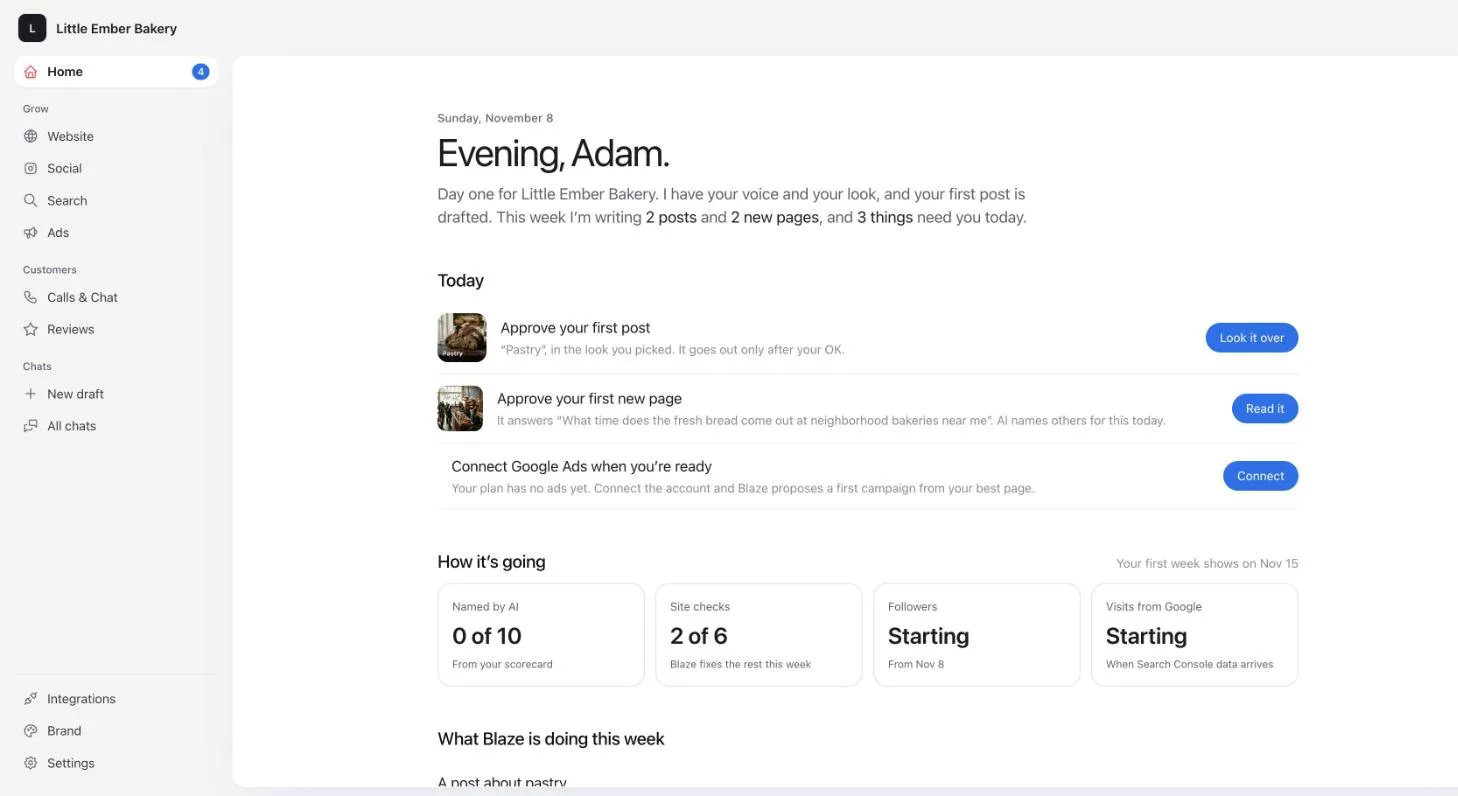
Blaze home screen for a bakery on its first day, with the first post and a new page waiting for approval
Day one: Blaze has read the website, drafted the first post, and lists what needs your OK.
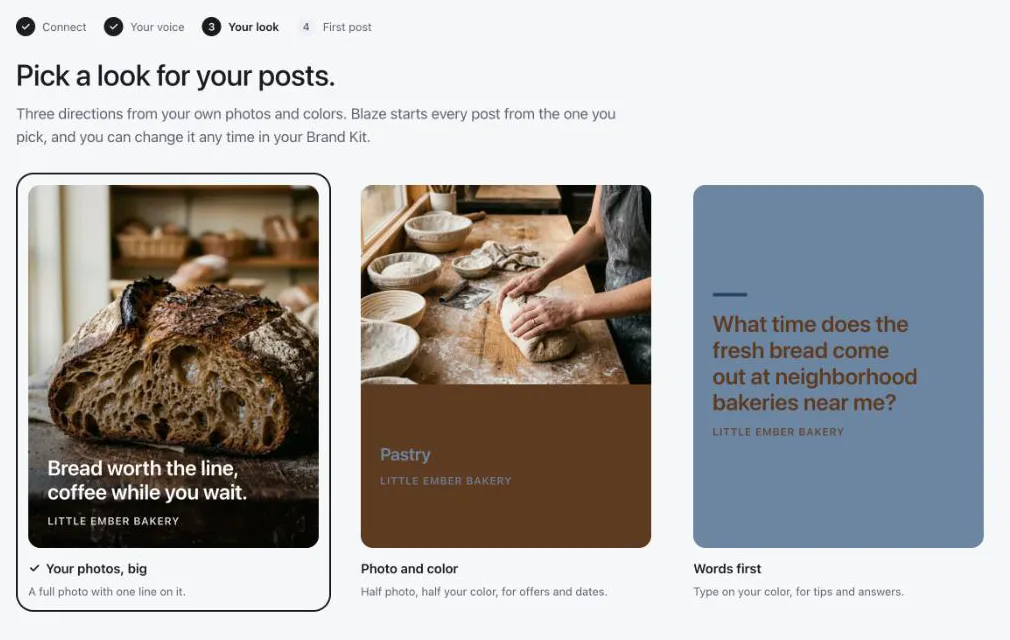
Blaze offering three post looks made from a bakery's own photos and colors
Three looks made from your own photos and colors. Blaze starts every post from the one you pick.
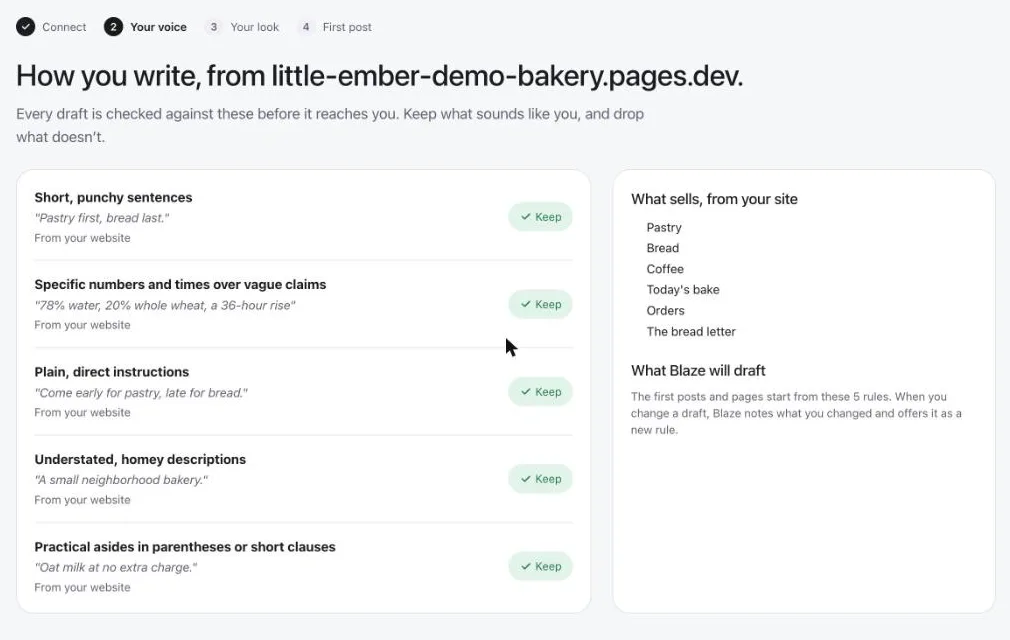
Blaze listing the writing rules it found on a bakery's website, such as short sentences and exact times
How you write, read from your website. Every draft is checked against these rules.

Shown in a demo workspace for Little Ember, a made-up bakery.

Prices

From $79 a month.
Try it free for 7 days.

No credit card for the trial, and you can cancel anytime. If your accounts are connected, posts start going out on day 3.

Starter

$79 a month

  • 3 posting accounts
  • 600 credits a month
  • 1 user
  • 1 active campaign at a time
Start free trial

All-In-One

$999 a month

  • Blaze runs your marketing for you
  • A dedicated marketing expert
  • Set up on a call, no trial
Book a call

A post costs 1 credit, a blog post or email 3, an AI video 15. Yearly billing costs less; non-profits and schools get 20% off yearly plans. Full details on the pricing page.

From your AI assistant

Ask Claude or ChatGPT for a LinkedIn post. Blaze puts it on the calendar.

Connect the Blaze MCP server to Claude, ChatGPT, Codex or Cursor and your assistant can write LinkedIn posts and schedule them in Blaze. Everything it makes is saved as a draft first.

How it works

Questions

LinkedIn scheduling, answered.

Can Blaze schedule LinkedIn posts?

Yes. Blaze schedules and publishes image and video posts to LinkedIn.

Can it post to a company Page or only my profile?

Both. You can connect your profile and your company Pages.

How big can LinkedIn videos be?

Up to 500MB each.

Can I see how my LinkedIn posts did?

Yes, for company Pages. The Insights tab shows highlights over 7 or 30 days, with history up to a year.

Can my team approve posts first?

Yes, on the Growth plan, which also has unlimited users.

How much does Blaze cost?

Starter is $79 a month for 3 posting accounts. Growth is $149 a month for 10 accounts and unlimited users. Both start with a 7-day free trial, no credit card.

A month of posts,
already on the calendar.

Start a 7-day free trial. No credit card.