
How Do I Automate My WordPress Account? | Blaze.ai Integration Guide

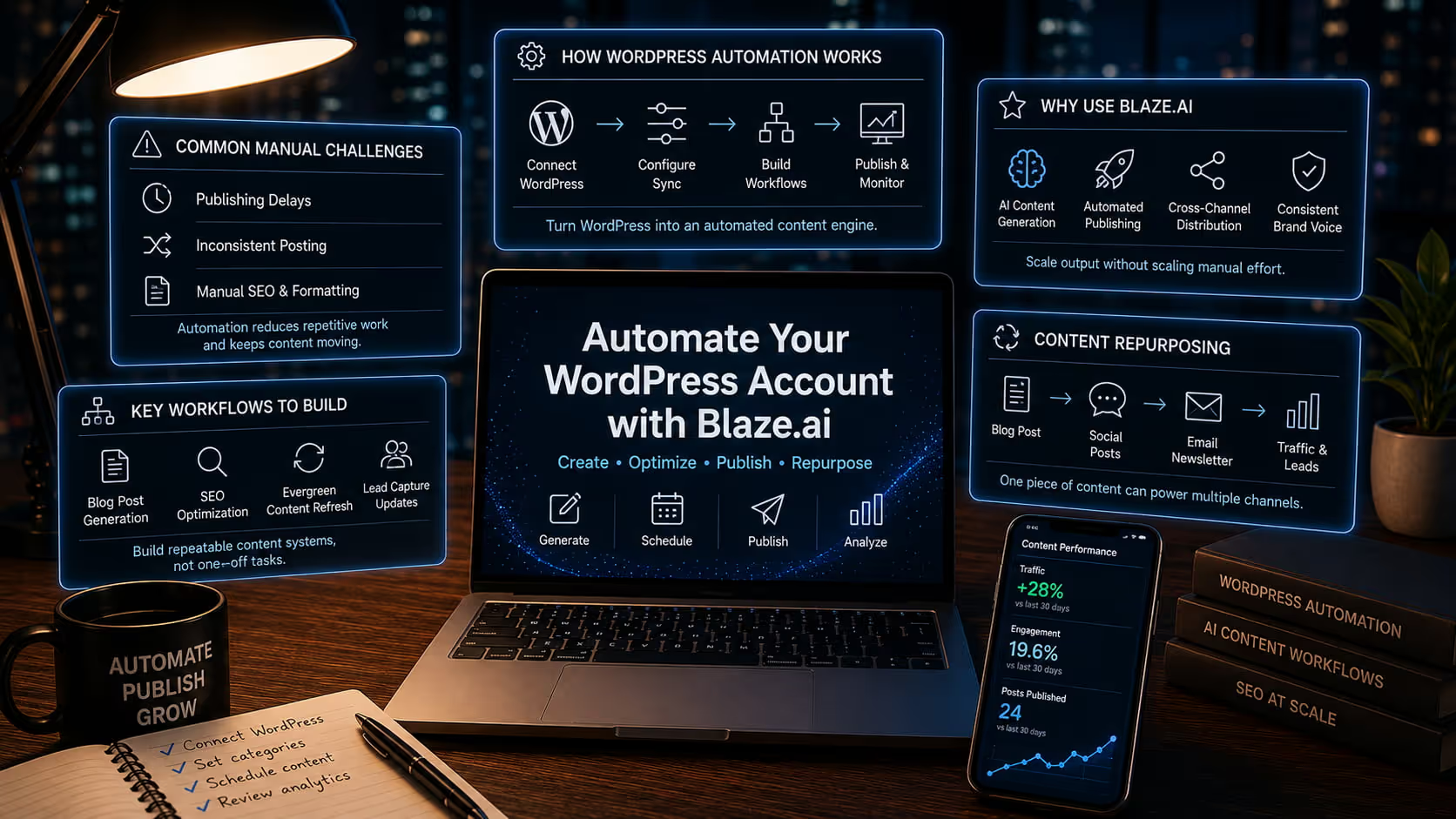
How Do I Automate My WordPress Account with Blaze.ai?
Introduction to WordPress Automation
Why automation is essential for modern websites
In today's digital landscape, website management has grown increasingly complex. Publishing content manually, optimizing every post for search engines, and maintaining a consistent presence across multiple channels demands enormous time and effort.
Automation has shifted from being a luxury to a necessity for any website owner who wants to stay competitive. By automating repetitive tasks, teams can focus on strategy, creativity, and growth rather than getting bogged down in operational details.
For WordPress site owners in particular, automation represents the difference between a stagnant site and one that consistently attracts and converts visitors.
Common manual challenges in managing WordPress sites
Managing a WordPress site by hand introduces a range of friction points that slow teams down and compromise results.
Content publishing delays
When content creation and publishing are handled manually, delays are almost inevitable. Writers finish drafts, editors review them, someone formats the post, another person schedules it and at any point in that chain, things stall.
These delays mean your audience waits longer for fresh content, and your site loses the momentum that consistent publishing builds with search engines.
Inconsistent posting schedules
Search engines reward consistency. Sites that publish regularly tend to rank better than those that post sporadically. Yet without automation, maintaining a reliable cadence is difficult.
Holidays, team vacations, heavy workloads, or simply losing track of the editorial calendar can all disrupt your schedule and signal to Google that your site is less active than it should be.
Manual SEO and formatting tasks
Optimizing each blog post manually researching keywords, writing meta descriptions, structuring headings, adding internal links, compressing images is time-consuming work.
When these tasks fall entirely on human shoulders, they are often rushed or skipped altogether, resulting in content that underperforms in search results despite the effort invested in writing it.
How AI tools like Blaze.ai transform WordPress workflows
AI-powered platforms like Blaze.ai fundamentally change how WordPress sites operate. Rather than treating each piece of content as a one-off project, Blaze.ai enables teams to build systematic, repeatable workflows that handle everything from initial content generation to publishing and distribution.
The result is a site that runs more like a content engine than a manual operation, producing optimized material at scale without proportionally increasing the workload on your team.
What Does It Mean to Automate Your WordPress Account?
Core automation use cases
Automating your WordPress account means taking the tasks you would normally complete by hand and handing them off to a system that executes them reliably and consistently. The most impactful use cases fall into a few key areas.
Blog content creation and scheduling
Rather than writing every post from scratch and manually queuing it up in WordPress, automation allows you to generate content using AI, apply predefined formatting rules, and schedule it to publish at optimal times all within a single workflow. This means your blog keeps moving even when your team is focused elsewhere.
SEO optimization workflows
Automation can handle the SEO groundwork that often gets deprioritized when teams are pressed for time. Keyword insertion, meta tag generation, heading structure, and readability scoring can all be built into your content workflow so that every post that goes live is already optimized without requiring a separate review step.
Lead capture and content updates
Beyond publishing new content, automation can also manage the ongoing health of your existing library. Older posts can be automatically flagged for refreshes, updated with current information, and republished to signal freshness to search engines.
Lead capture elements can be inserted programmatically based on the topic or intent of each piece.
Native WordPress limitations (plugins vs. true automation)
WordPress itself is a powerful platform, but its native capabilities around automation are limited. Plugins like Jetpack or editorial calendar tools can handle isolated tasks scheduling a post, sending a notification, or resizing images, but they do not talk to each other in a meaningful way.
True automation requires a connected system where content creation, optimization, scheduling, and distribution happen as part of one coherent workflow rather than a patchwork of disconnected tools.
Where Blaze.ai fits into your content automation stack
Blaze.ai sits at the center of your content operation, acting as the intelligence layer that connects all the moving parts. It handles content generation, applies your brand voice, optimizes for SEO, and pushes finished content directly to WordPress on a schedule you define.
Instead of managing five different tools for five different tasks, Blaze.ai consolidates the entire workflow into one platform that is designed to scale with your needs.
Why Use Blaze.ai for WordPress Automation
AI-powered content generation at scale
Blaze.ai uses advanced AI to generate high-quality blog posts, landing pages, and supporting content at a pace no human team could match alone. You can produce more content without sacrificing quality, enabling your site to cover more topics, target more keywords, and serve a broader audience than would otherwise be possible with your current resources.
Automated publishing workflows
Once content is created and approved, Blaze.ai handles the publishing side automatically. Posts are formatted correctly, assigned to the right categories and tags, and pushed to WordPress at the scheduled time. You do not need to log into your dashboard to hit publish the workflow does it for you.
Cross-channel distribution (blog + social + email)
Content created for your WordPress blog does not have to live there alone. Blaze.ai can automatically repurpose each blog post into social media content and email newsletter segments, distributing your message across every channel your audience uses.
This multiplies the impact of each piece of content without requiring you to create entirely separate materials for each platform.
Consistent brand voice and messaging using AI personas
One of the biggest challenges in scaling content production is maintaining a consistent voice. Blaze.ai solves this with AI personas customizable profiles that encode your brand's tone, style, and messaging preferences.
Every piece of content generated through the platform reflects those parameters, so your audience experiences a consistent brand identity regardless of how much content you produce or how many people are involved in creating it.
How to Integrate WordPress with Blaze.ai
Step 1: Access Blaze.ai Integrations Dashboard
Start by logging into your Blaze.ai account and navigating to the Integrations Dashboard. This is the hub where you can connect Blaze.ai to the external platforms that are part of your content stack. WordPress is listed as a native integration, making the setup process straightforward even if you are not technically inclined.
Step 2: Connect your WordPress account
API or plugin-based connection
Blaze.ai offers two methods for connecting to WordPress. You can use a direct API connection by entering your WordPress site URL along with your credentials, or you can install a lightweight plugin that establishes the connection from the WordPress side.
Both methods achieve the same result a live link between Blaze.ai and your WordPress site that allows content to flow between them automatically.
Step 3: Configure content sync settings
Categories, tags, and publishing preferences
Once connected, you will configure how content is handled when it arrives in WordPress. This includes mapping Blaze.ai content types to the appropriate WordPress categories, assigning default tags, setting your preferred post status (draft, scheduled, or published), and defining author attribution.
Taking time to configure these settings carefully ensures that automated content lands in exactly the right place within your site structure.
Step 4: Build automated workflows
Content triggers and scheduling
With the connection established, you can begin building the workflows that define how your content operation runs. Workflows in Blaze.ai are built around triggers events or conditions that kick off a series of actions.
For example, you might trigger a new blog post to be generated every Monday based on a keyword from your content calendar, then automatically schedule it to publish the following Wednesday. You can build as many workflows as your strategy requires, each one targeting a different content type, audience segment, or publishing goal.
Step 5: Publish and monitor performance
After your workflows are live, Blaze.ai continues to work in the background, generating and publishing content according to your defined schedule. You can monitor performance directly within the platform, tracking metrics like traffic, engagement, and ranking changes.
This visibility allows you to identify what is working and refine your workflows over time without starting from scratch.
Key WordPress Automation Workflows You Can Build with Blaze.ai
Automated blog post generation and publishing
The most fundamental workflow is also the most impactful: automatically generating blog posts based on your target keywords and publishing them to WordPress on a recurring schedule. This workflow alone can transform your site from one that publishes occasionally to one that consistently grows its content library and search presence.
SEO-optimized content creation
Every piece of content generated through Blaze.ai is built with SEO in mind. Keyword placement, heading hierarchy, meta descriptions, and content length are all handled according to best practices, ensuring that automated content performs as well in search as anything your team would produce manually.
Content repurposing (blog → social posts → email newsletters)
Blaze.ai can automatically transform each blog post into a set of social media updates and an email newsletter excerpt. This repurposing workflow means that one piece of content does the work of three, reaching your audience across every channel without requiring your team to manually adapt each piece for each platform.
Evergreen content updates and refresh cycles
Content does not stay fresh forever. Facts change, search trends evolve, and older posts gradually lose their rankings if they are not maintained. Blaze.ai can automate a refresh cycle that identifies aging content, generates updated versions, and republishes them, keeping your library competitive without requiring a manual audit every few months.
How Blaze.ai Improves WordPress Content Performance
AI-driven keyword optimization
Blaze.ai analyzes search intent and keyword data to ensure that every piece of content targets the right terms at the right density. Rather than guessing at keyword placement or relying on a writer to remember SEO rules, the platform builds optimization directly into the content generation process.
Content structuring for readability and SEO
Well-structured content performs better in both search rankings and reader engagement. Blaze.ai automatically applies heading hierarchies, short paragraph formatting, bullet points where appropriate, and logical content flow all of which contribute to lower bounce rates and higher time-on-page metrics that search engines factor into their rankings.
Internal linking suggestions
Internal links are one of the most underutilized SEO tactics because they require familiarity with your entire content library. Blaze.ai can analyze your existing posts and suggest or automatically insert internal links that connect related content, distributing page authority across your site and helping search engines understand the relationship between your articles.
Performance analytics and optimization insights
Beyond publishing, Blaze.ai provides analytics that show you how your automated content is performing over time. You can identify which topics drive the most traffic, which workflows produce the highest-quality output, and where adjustments to your strategy would have the greatest impact.
Best Practices for Automating Your WordPress Account
Maintain editorial oversight
Automation is most effective when it handles the heavy lifting while humans retain final judgment. Build a review step into your workflows so that a team member can approve content before it goes live, particularly for high-stakes topics or pieces that carry your brand's credibility.
Use structured content templates
Templates give your automated content a consistent structure that aligns with your editorial standards. Define templates for each content type you produce how-to guides, listicles, product comparisons, thought leadership pieces and use them as the foundation for every automated workflow.
Align automation with SEO strategy
Your automated workflows should serve your broader SEO goals, not operate independently of them. Map your content triggers to a keyword strategy, prioritize topics based on search volume and competition, and ensure that the automation is producing content that supports the rankings you are trying to achieve.
Regularly audit and update automated workflows
Automation is not a set-it-and-forget-it solution. Search trends change, your audience evolves, and your business priorities shift. Schedule regular audits of your automated workflows to ensure they are still producing content that serves your current strategy and make adjustments as needed.
Common Mistakes to Avoid
Publishing low-quality AI content without review
AI can generate content quickly, but quantity without quality will damage your site's credibility and search rankings. Every piece of automated content should pass through at least a basic quality check before it goes live. Blaze.ai's output is high-quality by design, but a final human review adds an extra layer of assurance.
Over-automation without strategy
Automating for the sake of automating rarely produces results. Every workflow you build should serve a specific goal whether that is ranking for a target keyword, nurturing a particular audience segment, or maintaining a publishing cadence.
Without strategic intent behind your automation, you risk filling your site with content that does not move the needle.
Ignoring SEO fundamentals
Automation speeds up content production, but it does not excuse skipping SEO fundamentals. Make sure your automated workflows incorporate keyword research, proper heading structure, optimized meta tags, and internal linking.
Blaze.ai handles most of this by default, but understanding the principles ensures you configure your workflows correctly.
Failing to track performance metrics
The greatest advantage of automation is the data it generates at scale. If you are not tracking how your automated content performs, you are leaving valuable insights on the table. Monitor traffic, rankings, engagement, and conversion metrics regularly and use that data to continuously improve your workflows.
Who Should Use Blaze.ai + WordPress Integration
Content marketers and bloggers
For content marketers and bloggers, Blaze.ai removes the bottlenecks that slow down production. You can maintain a robust publishing schedule, experiment with more topics, and spend your creative energy on strategy and storytelling rather than operational tasks.
Small business owners managing their own websites
Small business owners who handle their own websites often wear too many hats to give content the attention it deserves. Blaze.ai makes it possible to maintain a professional, consistently updated site without dedicating hours every week to writing and publishing.
Agencies scaling content production
For agencies managing multiple client websites, Blaze.ai is a force multiplier. You can serve more clients, deliver more content, and maintain quality standards across every account all without proportionally growing your team.
eCommerce brands leveraging content marketing
eCommerce brands that use content to drive organic traffic and nurture customers can use Blaze.ai to keep their blog active, their product pages optimized, and their email list engaged all through automated workflows that run in the background while the team focuses on product and customer experience.
Conclusion: Turn WordPress Into an Automated Content Engine
Automating your WordPress account goes far beyond scheduling posts, it is about building a scalable content system that consistently drives traffic, engagement, and conversions.
While WordPress plugins can handle isolated tasks, Blaze.ai enables a fully integrated, AI-powered workflow that connects content creation, optimization, and publishing.
By leveraging Blaze.ai, you can eliminate repetitive tasks, maintain a consistent publishing cadence, and ensure every piece of content is optimized for performance.
Get Started with Blaze.ai Today
Ready to automate your WordPress account and scale your content strategy?
Connect your WordPress site through Blaze.ai integrations, generate and publish AI-powered content, and streamline your entire content marketing workflow.
Start here: https://www.blaze.ai/integrations